FREE Admin Menu: Searchable Staff Command Desk
The record
Find a staff action by name, pick the online player, and run it.
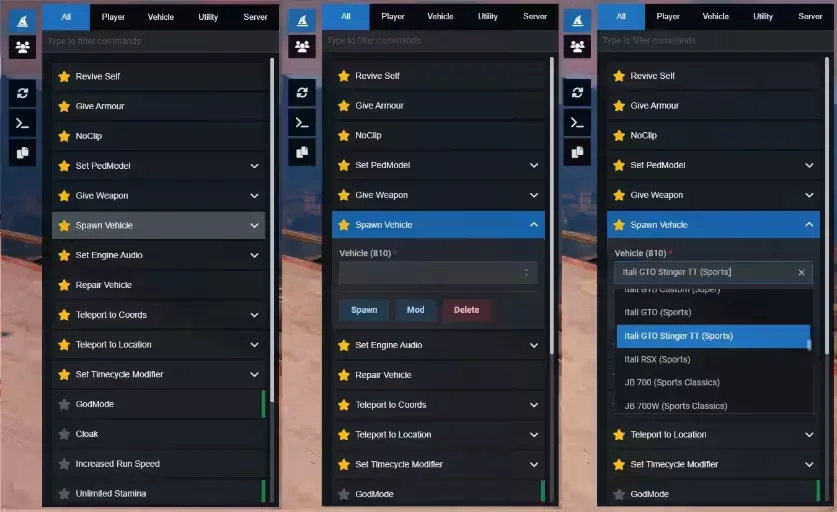
This free FiveM admin menu is a searchable staff interface over your server commands, with a player list, moderation forms, teleports and freecam. It requires ox_lib and oxmysql. QBCore is optional and adds character, money, job, gang and item management features.
Handling a staff ticket
A player reports being stuck under the map. A staff member presses U (or types /admin), searches the Commands tab for a teleport, picks the player from the online list and sends them to a preset location. Done without typing a single raw command.
That is what this free menu provides: a searchable front end over the commands your server already has. It does not replace them. Revive, vehicle spawn, repair, kick and ban still need working server commands and the right permission checks behind them.
What staff see
Commands tab. Filter by Player, Vehicle, Utility, User or Server, or search by label. Favourites are saved locally with Resource KVP. One-click entries run immediately; entries that need values open a form first.
Players tab. A refreshable list of connected players with ped headshots. On QBCore it also shows citizen ID, character name, job and gang grades, cash and bank. Quick buttons pass the selected player's ID to revive, kill, kick or ban.
Sidebar. Copy coordinates, switch developer mode, reload command definitions (this clears favourites after a confirmation) and, on QBCore, log out.
Tools included
| Area | Actions |
|---|---|
| Character | Armour, ped model, weapon assignment; on QBCore also needs, stress, money, job, gang and items |
| Vehicles | Spawn, repair, teleport into driver seat, engine audio, modifications through ox_lib vehicle properties |
| Movement and view | Marker, coordinate and preset teleports; noclip, invisibility, run speed, stamina, jump, night vision, thermal, timecycle |
| Moderation | Kick and ban forms with reason and duration, plus a server-wide kick |
| Camera | Freecam with keyboard and gamepad; right-click to look, scroll for speed, Shift and Alt for faster or slower |
Godmode, visibility, speed, vision and timecycle toggles reset when the resource stops.
Making it fit your server
Menu entries are JSON. shared/commands.json holds labels, command names, filters, arguments and action types; shared/quickactions.json holds sidebar entries and submenus. Forms support text, numbers with min, max and step, checkboxes, sliders, autocomplete, searchable and multiple selections, and dependent selections such as a job's grades. Reference lists for vehicles, weapons, peds, teleports, timecycles, weather, items, jobs and gangs are JSON too.
Install and permissions
- Place
ag-menuin your resources folder. - Start ox_lib and oxmysql before it (both required; qb-core is optional).
- Add
ensure ag-menutoserver.cfg. - Give staff only the ACE permissions they need, and check that an ordinary player cannot use them.
Commands are checked through ox_lib:checkPlayerAce and command.<commandName> permissions; pedmodel and giveweapon require group.admin.
For developers
Open or close with the client event admin:toggleMenu. Server events include admin:server:RemoveStress, admin:server:RelieveNeeds and ag:setPedModel; lookups use ag:getTargets, ag:getPlayers and ag:GetPedheadshotTxdString. QBCore detection lives in init.lua. The built interface is in web/build/; it is made with React 18, TypeScript, Vite, Mantine 7, react-hook-form, Jotai and Font Awesome, and rebuilt with npm install then npm run build in web/.
Frequently asked questions
Does this free admin menu require QBCore?
No. ox_lib and oxmysql are required; qb-core is optional. QBCore adds character and economy details and the associated management actions. Commands still need to exist on your server.
How do I install and open the admin menu?
Place ag-menu in the resources folder, start ox_lib and oxmysql before it, and add ensure ag-menu to server.cfg. Staff open the menu with U by default or /admin after the required permissions are configured.
How are staff permissions checked?
The menu checks commands through ox_lib:checkPlayerAce and command.<commandName> permissions. The pedmodel and giveweapon commands require group.admin. Verify access using both a staff account and an ordinary player account before launch.
Can I add commands without rebuilding the interface?
Menu definitions live in shared/commands.json, with sidebar actions in shared/quickactions.json. Edit these definitions to configure labels, commands, arguments and forms; the underlying server command and permission checks must still be implemented.
No reviews on file
Nobody has reviewed this listing yet. If you bought it, yours goes below and is published once it clears moderation.
Write a review
Reviews are moderated before appearing. Purchased the product? Your review gets a VERIFIED badge automatically.
Filed alongside
Other entries in the same part of the catalogue.
-
Russian Roulette Game FiveM
Stage a fictional game of chance between characters inside your roleplay session.
$9.00
-

FREE Vehicle Rental Script
Offer temporary transport through a rental system with five preset vehicle groups.
FREE
-
Deployable Emergency Vehicle Light
Fit a temporary roof beacon when a vehicle needs an emergency-service role.
$12.99
-

Drift Tires and Car Lift Pack
Prepare drift setups in a workshop bay with tyre behaviour and a vehicle lift.
$20.00
-

Zombies & Dungeon: Wave Events and Boss Raids
Three keys open the dungeon; the walls inside have to be shot down before the boss appears.
$20.00
-
 NEW
FREE OBD Car Device
Connect a diagnostic device to inspect faults and live readings from a vehicle.
FREE